

How to Clean and Maintain Your Smart Glasses

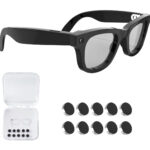
You spent $109 on a pair of smart glasses. The last thing you want is to scratch the lens cleaning it wrong, or kill the speaker grilles with a rinse you assumed was fine. Smart glasses aren’t regular frames — there’s a 12MP camera, open-ear speakers, and a microphone built into them, and those components need a bit more thought than your average pair of optical lenses.
This guide covers everything: how to clean the lenses without touching the camera, what splash-resistant actually means in practice, charging habits that extend battery life, and storage tips that keep the frame in good shape for the long run.
Cleaning the Lenses Without Damaging the Camera
The lenses themselves clean like any quality optical lens — but there’s one extra rule: avoid pressing directly on the camera housing in the corner of the frame. Pressure there can shift the module over time.
Safe to use:
- Microfiber cloth (included in the box) — the right tool for everyday smudges, no liquid needed
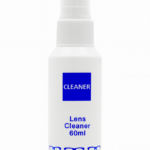
- Lens cleaning solution — spritz on the cloth first, never spray directly onto the lens or frame
- Pre-moistened lens wipes — fine for travel or quick cleans away from home
Avoid these:
- Paper towels, tissues, or shirt fabric — all of them leave micro-scratches on optical-quality lenses
- Spraying liquid directly at the frame — moisture can wick into the camera module through small gaps
- Alcohol above 70% concentration — strips lens coatings and can cloud polarized lenses permanently
If you ordered prescription lenses (custom, ships within +7 business days), follow whatever coating-specific care your optician recommends — the Aventa frame is compatible, but Rx coatings vary.
Cleaning the Frame, Speakers, and Mic
The frame, temples, and nose pads can be wiped down with a slightly damp cloth. Use minimal moisture and dry immediately — you’re not washing a plate, just removing skin oils and debris.
The open-ear speakers sit on the underside of the temples and face downward when worn, which naturally protects them from most dust. To clean the grilles:
- Use a dry, soft-bristled brush — a clean toothbrush is perfect for this
- Never use compressed air directly into the speaker openings — it displaces internal components
- Don’t insert anything into the grille — the bristle brush is all you need
The microphone is built into the right temple. Same approach: soft brush, no liquid anywhere near the opening.
Water Resistance — What It Actually Means
The Aventa Smart Glasses are splash-resistant. That’s a specific rating — it means they handle real-world moisture without panic, but they’re not waterproof. Knowing the line saves you from an avoidable problem.
Handled without issue:
- Light rain while walking or cycling
- Sweat from a run or workout
- Wiping down with a damp cloth
Avoid these situations:
- Rinsing under a faucet or submerging in any water
- Heavy sustained rain for extended periods
- Steam environments — saunas, hot showers, steam rooms (condensation gets into every gap)
If they get caught in rain, wipe them down with a dry microfiber cloth immediately and let them air out for 30 minutes before putting them back in the case or charging. Moisture plus a charging port is always a bad combination.
For what it’s worth: Ray-Ban Meta at $299 carries the same IPX4 splash-resistance level. So you’re not giving anything up on water resistance by going with Aventa.
| Feature | Aventa Smart Glasses | Ray-Ban Meta |
|---|---|---|
| Water resistance | Splash-resistant | IPX4 splash-resistant |
| Safe to submerge | No | No |
| Price | $109 | $299 |
| Charging case | Included | Select models only |
| Subscription required | No | Meta+ for some features |
Charging Best Practices
The glasses themselves get around 3 hours of active use per charge. The charging case extends that — most people get through a full day of casual use between case charges.
To protect your battery over the long term:
- Don’t leave them at 100% on charge overnight repeatedly — lithium batteries degrade faster sitting fully charged for hours at a time
- Store in the case between uses — it keeps the battery at a healthy level instead of letting it fully drain
- Use the included cable — standard USB-C cables are fine, but skip ultra-fast chargers that push more wattage than the case was designed for
- Storing for a week or more? Leave them at 50–70% charge, not fully topped off or completely drained
Some capacity drop over months is normal lithium behavior — not a defect. With regular daily use, most users don’t notice a meaningful drop in the first year.
Storage Tips That Actually Matter
The case handles most of this — use it. But a few habits extend the life of both the frame and the lenses significantly.
- Fold the temples before storing — leaving them open puts constant stress on the hinges over hundreds of open/close cycles
- Keep the case away from heat — a car parked in summer sun can hit temperatures that degrade both battery cells and lens coatings
- Don’t toss them loose in a bag — keys, pens, and coins will scratch optical-quality lenses faster than you’d expect
- Traveling? The original case is shaped for the Aventa frame specifically — a generic pouch doesn’t offer the same lens protection
Quick Troubleshooting
Camera looks smeared after cleaning: You likely left cleaning solution residue on the lens. Wipe again with a clean, dry microfiber cloth in slow circular motions. If you came in from the cold, give it 2–3 minutes — temperature change causes temporary fogging that clears on its own.
Audio sounds muffled after getting wet: Leave the glasses open (not in the case) in a dry room for 1–2 hours. Do not charge during this time. This resolves on its own in the vast majority of cases.
Speaker grilles look blocked: Soft-bristled brush, gentle strokes along the grille. That’s it.
If something doesn’t clear up after a day, reach out to Aventa support — all orders come with a 30-day money back guarantee, and the team can help you troubleshoot before it gets to a return.
If you don’t have your pair yet, the Aventa Smart Glasses ship from US warehouses in 2–5 business days at $109, with no subscription fees and prescription lens compatibility if you need it.
Last updated: April 2026