

Smart Glasses for Teachers: Record Lessons and Get AI Help Hands-Free

Three students are out sick, and a parent just emailed asking if you recorded today’s lesson. You didn’t — because that would have meant propping up a tablet, fussing with the angle, and remembering to hit stop before lunch. Nobody has time for that.
That’s the gap smart glasses for teachers are quietly filling. Hands-free recording, built-in AI, and no camera setup required. Here’s what they actually do well in a classroom — and whether they’re worth it.
What Smart Glasses Actually Do in a Classroom
The short version: you wear them like regular glasses, they record what you see, and the built-in AI assistant responds to voice commands. No phone to hold, no app to tap, no “hang on, let me Google that.”
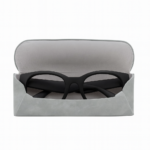
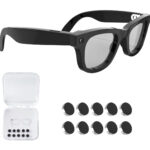
The Aventa Smart Glasses capture 1080p video and 12MP photos from a first-person perspective — so your recordings look like a natural front-of-room view of the lesson. The open-ear speakers let you hear audio feedback without blocking classroom sound, and the microphone picks up your voice clearly even while you’re moving around the room.
Battery life is around 3 hours of active use, which covers most class blocks. The charging case tops it up between periods so you’re set for a full school day.
Recording Lessons for Absent Students
This is the most immediate use case, and it works better than you’d expect. Put the glasses on, use a quick voice command to start recording, and teach the way you normally would. The footage captures your movement, the board, and your narration — all from your perspective.
For absent students, that’s more useful than a static camera pointed at the whiteboard. They see the lesson the way the students in the room did. You can trim and share clips via Google Drive, Canvas, or whatever your school uses.
It also removes the awkward “I’m being recorded” energy that a tripod camera creates. For most teachers and students, glasses-mounted recording starts to feel routine within a few class periods.
Getting AI Help Without Breaking Your Flow
The built-in voice assistant is ChatGPT-compatible, which means you can ask it real questions mid-class and get useful answers. A student asks about the etymology of a term you just wrote on the board. You don’t know it off the top of your head. Instead of saying “look it up,” you ask your glasses and have an answer in a few seconds.
It won’t replace knowing your subject — and it’s not meant to. But for the moments where you want to confirm a date, expand on a definition, or pull a quick example, it’s faster than reaching for your phone and far less disruptive to the lesson.
As hands-free teaching tools go, that’s the part that actually matters: you can be writing on the board, distributing papers, or guiding group work while the AI runs in the background. The experience of having AI glasses in the classroom is less about flashy features and more about removing friction at the right moments.
Using Footage for Professional Development
Most teachers have never watched themselves teach — not because they don’t want to improve, but because setting up a proper classroom recording is a hassle and reviewing it afterward is even more awkward.
With smart glasses, the footage is already there. You can watch your own pacing, notice where students started to disengage, or see how you handled a difficult question in the moment. It’s the kind of honest self-review that coaching programs charge thousands of dollars for, done quietly on your own schedule.
Some districts are using this for peer observation and mentorship — a first-year teacher sharing footage with a department head without scheduling a formal observation visit.
How It Stacks Up Against Other Options
| Option | Cost | Setup Required | Hands-Free? | AI Features |
|---|---|---|---|---|
| Aventa Smart Glasses | $109 | None — just wear them | Yes | Voice assistant, ChatGPT-compatible |
| Dedicated classroom camera + tripod | $300–$1090+ | Mounting, positioning, cables | No | None |
| Ray-Ban Meta Glasses | $299 | None | Yes | Meta AI (some features tied to Meta account) |
| Tablet on a stand | $150–$400 | App setup, angle adjustment each class | Partially | Depends on app |
A decent classroom camera and tripod setup runs $300–$1090 and still needs repositioning every day. The Ray-Ban Meta is a well-built product, but at $299 it’s a harder sell when you’re buying this out of pocket — and some features are tied to the Meta ecosystem.
The Aventa comes in at $109, ships from a US warehouse in 2–5 business days, and includes a 30-day money-back guarantee. If it doesn’t fit your classroom, return it.
Who This Is Actually For
- Teachers who need to record lessons for absent students without setting up a separate camera each day
- Educators focused on professional growth who want honest, self-directed feedback on their own teaching style
- Special ed and resource room teachers who work hands-on with students and can’t manage a camera at the same time
- Teachers in districts piloting AI tools — the voice assistant integration is a natural fit for AI-in-education initiatives
- Prescription glasses wearers — custom Rx lenses are available as a special order (add 7+ business days to delivery)
It’s a less obvious fit if you primarily teach from a fixed position, work in a district with strict recording-consent policies, or need a display that shows content in your field of view. For those situations, other tools may serve you better.
The Honest Take
The Ray-Ban Meta is a genuinely good product — solid build, good camera, well-integrated AI. If you’re already in that ecosystem and the price isn’t a barrier, it’s worth considering. But at $299, it’s a real ask for a personal classroom tool.
For lesson recording, hands-free AI access, and self-directed professional development, the Aventa covers the bases at $109. It weighs 48g — just slightly lighter than the Ray-Ban Meta — and doesn’t require a subscription to do what it’s built for.
The 30-day return window is long enough to test it across a real teaching week. If it changes how you run your classroom, great. If not, send it back.
See the full specs and pick up a pair at Aventa Smart Glasses.
Last updated: May 2026